New self-serve features now available in My Profile
At a glance (1 minute read)
- Members can now update more of their personal and professional information directly through My Profile on our member website.
- Editable fields now include biography, personal details, and online presence, while office, licence, and subscription details remain managed by GVR.
- Updates to information synced with Realtor.ca will appear within 24 hours.

We’ve added new self-serve features to the My Profile section of our member website to make it easier for you to keep your information up to date.
While My Profile has long provided an overview of your contact details, you can now edit additional fields on your own, without needing to contact GVR. My Profile will also show your license and subscription details.
What you can now update
Members can edit:
- Contact information – email, primary phone number, and home address (synced with Realtor.ca)
- Biography – up to 4,000 characters
- Personal details – birth year, education level, and languages spoken
- Professional specialities – areas of expertise, trading areas, and professional designations
- Online presence – team name (as registered with BCFSA), Personal Real Estate Corporation status, website, and social media links
Not all fields in Additional Details will appear on Realtor.ca. An information icon in My Profile will identify which fields sync automatically.
Updating other information
Some details can still only be changed through other methods:
- Office and licence information is updated through contacting us.
- Subscription information (MLS® Fixed Fee, VOW status, SentriLock, Commercial Edge, Reciprocity) is updated by contacting us.
- Member photo is updated by uploading it to the MLS® system.
When you add a new subscription by contacting us, your My Profile page will automatically update to reflect it.
How to access the new My Profile
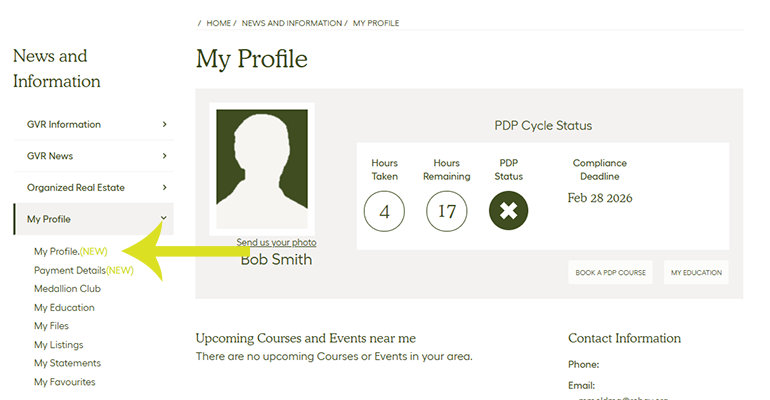
Sign in at member.gvrealtors.ca. Once signed in:
- Select your account (if you have access to more than one).
- Choose My Profile on the top right-hand side of the screen in top navigation bar.
- Select My Profile (New) on the left-hand navigation menu.
Any changes to synced fields will appear on Realtor.ca within 24 hours. Updates can be made at any time, day or night.
New My Profile overview

1. Contact information
2. Organization information
3. Subscriptions
4. License information
5. Additional details, including biography, specialties, and more